Posts

Image
String Encoding for Talend/JaspersoftETL for Basic Authentication/md5/sha-256 What is a convenient way to encode usernames/passwords for use in my ETL jobs? First copy the java code on this Github Gist into your clipboard: Second  Create a routine called hashingUtils (name is important!). Paste the Java code from above and save the routine Third you can now use the following methods in any component: hashingUtils.basicAuth("username","password") hashingUtils.md5encode("string") hashingUtils.sha256encode("string") For example, in a tHttpRequest Component:

Dealing with Nested Documents in MongoDB and Talend (aka Baking a Cake)

Image
Abstract: MongoDB is a very popular document database that gives you a huge amount of flexibility when it comes to storing data. On the other hand, the traditional relational model is far less flexible in how data is stored - you're limited to columns and rows. Sometimes you want to go from a flexible model like MongoDB to a relational one, that's what this post attempts to explain using  Talend / JaspersoftETL  (ETL tools). I do not want to get into the relational vs non-relational model argument in this post - it's only an example if you need to do this for some reason...I'm pro choice :) Scenario: We have a JSON document in MongoDB that looks like this: { "id" : "0001", "type" : "donut", "name" : "Cake", "ppu" : 0.55, "batters" : { "batter" : [ ...

Deleting Old Scheduled Report Ouptuts Using the Jaspersoft REST API

Image
I get this request quite a bit - how do I clean up old artifacts from the Jaspersoft repository? Old artifacts are typically reports that are scheduled and then saved into the repository. I explain this in a short video: Here are some specifics about the Talend/Jaspersoft ETL job used: tHttpRequest - Does a GET to the URI "http://localhost:8080/jasperserver-pro/rest_v2/resources?recursive=true&type=file&folderUri=/public/ScheduledReports" and writes it to an XML file. API reference- see "Searching the Repository" tFileInputXML - Reads the XML response from file (written by tHttpRequest) tFilterRow - Filters the XML file on the field "creationDate" with the value: TalendDate.parseDate("yyyy-MM-dd", "2014-03-04") tFlowToIterate - takes each request and iterates through them tREST - For each file (URI) we run the DELETE command: "http://localhost:8080/jasperserver-pro/rest_v2/resources" + ((String)globalMap....

Geospatial Features in MongoDB with Jaspersoft

Image
Lately I have been posting technical examples to the Jaspersoft community wiki instead of this blog. I'll cross-post this one because there are not many examples of doing this. When working with Geospatial data, I found the $near operator to be pretty sweet. Let me show you by example. In the screenshots below you'll see that I constructed a report that shows "cases" on a map. When you click on a specific case you will be taken to a detail level report. The detail level report will show you cases nearby for that service. So for example, if someone reports a broken street light on Market Street, this might help you locate similar cases. So how is it done?  Quite simple really, take a look at this mongodb  query : Line 8: The $P{location} parameter is a java.util.List that contains longitude and latitude coordinates, something like [-122.4194200,37.7749300] Line 11: How many meters from the center (specified in line 8) should it search Line 13: T...

New MongoDB Components in Talend/JaspersoftETL

Image
I uploaded two videos with examples of using the tMongoDBInput and tMongoDBRow components that are shipping with JaspersoftETL 5.2.2 (Plus edition) and Talend 5.2.2+ I recommend you change the quality to 720p to watch the videos in better quality. I hope you find them useful! Part 1: Using tMongoDBInput (and using Talend's built in aggregation engine): Part 2: Using tMongoDBRow (and the aggregation framework):
Emailing me files is no longer OK. It's 2013 - wiki, evernote, soundcloud, google docs, etc. Files in 2013 are like paper in 1999 — ernestbro (@not_a_poet) February 28, 2013

Report Bursting in JasperReports Server

Image
What is report bursting? Take this example. You have a report that shows all the accounts that a particular employee owns in your company. The user can log into your reporting system and ask for the report, he'll be asked to enter his employee ID or maybe it will be filled in automatically based on who he/she is. Now your boss asks you (a BI professional) to send each employee their list of accounts on a weekly basis...yikes! You need to automate this. What do you do? As of Jaspersoft version 5.0 there's no UI built into the web-application to handle the complex task of report bursting. Designing an UI that let's you iterate through any possibility of inputs, read any possibility of values and output to any possible medium is tricky, for now you have to build your own utilities using the rich SOAP or REST APIs that are available in JasperReports Server. The easiest way I found to do this using is using JaspersoftETL (Talend) and a component called tJasperServerExec ...

MongoDB Aggregation Queries Basics on MongoLab

Image
What is MongoLab? MongoLab is a hosted MonoDB  service that offers one free database to developers wanting to learn the technology. It's a very elegant way to start learning or developing a small application. I started using this earlier in the year and had created a couple of collections on it.  What is the MongoDB Aggregation Framework? Traditionally in SQL databases you have the concept of a GROUP BY and an aggregation function like average or sum. In MongoDB, aggregation wasn't ever as easy, in order to do any aggregation you'd have to write your own complicated MapReduce jobs. Along comes MongoDB version 2.2 , which includes the aggregation framework. So consider this SQL statement: SELECT sum(duration) FROM calls GROUP BY disposition And here it is translated to MongoDB, I've attempted to color code the translations: } runCommand: { aggregate : 'calls', pipeline : [ { $group : { ...

Jaspersoft Report Writing Best Practices

Image
The following is a set of guidelines for developing reports with iReport and JasperReports Server. It was compiled with the help of  Frau Klein Best Practice - report resources: Report units contain references to the resources they use: images, styles, sub-reports, queries, input controls -  example Why ? Promotes re-usability (nothing is local to report unit). Easy maintenance around moving report units, replacing resources in a mass scale.   Best Practice - references:  Never hard code an entire repository path to resource, the image repo:/reports/images/image.png should come in as a reference like repo:image.png   - example Why? When you use js-export with --uris option it only resolves repository dependencies, it doesn't look for expressions that maybe use an absolute repository path   Best Practice - styles: Do not hard code any style information to JRXML. Develop central style templates (jrtx, jrctx) for all your repo...

TalendDate

Not a lot of examples around TalendDate so thought I'd post a couple of quick examples: Today's date: TalendDate.getDate("yyyy-MM-dd") Returns: 2012-04-12 Yesterday's date: TalendDate.addDate(TalendDate.getDate("yyyy-MM-dd"),"yyyy-MM-dd",-1,"dd") Returns: 2012-04-11 Tomorrow's date: TalendDate.addDate(TalendDate.getDate("yyyy-MM-dd"),"yyyy-MM-dd",1,"dd") Returns: 2012-04-13 Date format: CC - century YY - year MM - month DD - day of month hh - hour mm - minutes ss - seconds Return types: string! Other methods: TalendDate.compareDate(myDate,myDate2,"yyyy-MM-dd") TalendDate.diffDate(myDate,myDate2,"MM") TalendDate.formatDate("yyyy-MM-dd HH:mm:ss",myDate) TalendDate.setDate(mydate,newValue,"MM") TalendDate.getFirstDayOfMonth(mydate) TalendDate.getLastDayOfMonth(mydate) TalendDate.getRandomDate("2007-01-01","2008...

Flush Jaspersoft OLAP Cache from Talend/JasperETL

Image
JaspersoftETL is a Java code generation tool designed to load your operational data into a  data warehouse  and get it ready for reporting and analysis.   Jaspersoft OLAP  takes advantage of aggregate tables and an in-memory cache to speed up queries. If you're running a nightly job to load the DW, it's a good idea to clear the OLAP cache at that time, otherwise your users will not take advantage of new data. There are several ways to clear the OLAP cache: Login with superuser privileges and display the OLAP Settings page. In the OLAP Settings panel, click Flush OLAP Cache .    Using utilities such as cURL and wget, send an HTTP request to this URL: http://server:8080/ olap/flush.html?j_username=superuser&j_password= Restart the application server instance.  Call the Java API. I've created a small component that allows the clearing of cache via the URL method from a JasperETL/Talend job. Essentially it will prompt you for a userna...

Using tGoogleAnalyticsInput in JasperETL/Talend

Image
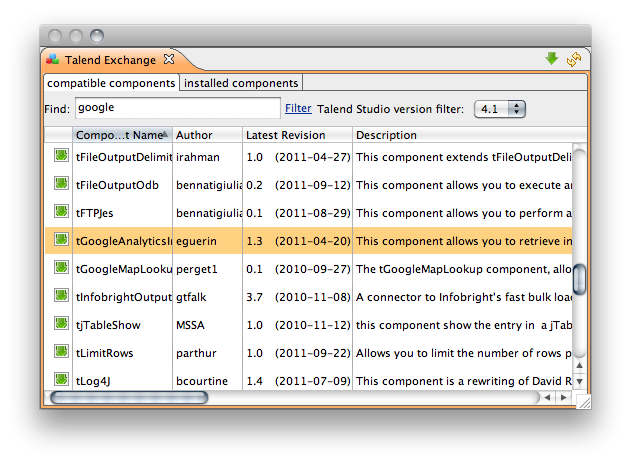
This is a short article on getting Google Analytics into JaspersoftETL / Talend ETL tools. Google Analytics has a nice interface and many great ways of analyzing web traffic, it'd be hard to beat the work Google did there. The purpose of this connector would be to bring the data into your own data warehouse and join it with other intelligence you might have. A great way to display the aggregated data would be with a BI tool like  Jaspersoft . I'm writing because the help for the tGoogleAnalyticsInput is in French and incomplete. So let's get started. You'll need JasperETL 4.1.2 or older (commercial editions here , open source here ). Installing the plugin: Create a new Job Design and drag the tGoogleAnalyticsInput component from the Palette (under Internet): Configure the component. First start with finding some fields you'd like to use from the Google API: http://code.google.com/apis/analytics/docs/gdata/dimsmets/dimsmets.html....

Icinga Reporting with JasperReports Server - Part 2: Usage + Basic Report Development

Image
Short tutorial, shows how to schedule a report, how to change the way you are prompted for parameters and some basic editing of reports within iReport

Icinga Reporting with JasperReports Server - Part 1: Installation

Image
A quick overview of how to install and configure the reporting add-on packages for Icinga (a Nagios Monitoring Fork), written for JasperReports Server.

Backing Up JasperServer in Linux

Image
This is a sysadmin how-to for backing up JasperReports Server (formerly JasperServer) and it's database (MySQL only for now). I wrote a fairly robust script to achieve this task. It will read the database configuration from your default_master.properties file, work with several versions of JasperServer, delete old backups, write to the syslog and export the repository contents to file. First drop my backup script into your \buildomatic folder if you're using 4.0 and abovie, 3.7 and below put in your /scripts folder. Once the script is in place edit the variables at the top of the script: This is to signify that you're using JasperServer 3.7.1 and below: IS_PRE_4=false This is a name for the product: PRODUCT_NAME="JRS-4.0-Pro" This is where backups will be stored: BACKUP_DEST="/home/ernesto/Dropbox/Backups" This will delete old backups if set to true DELETE_OLD=true How many days to keep old backups DAYS=120 Now add it to your cr...

Music Player Daemon w/ lame Support in Debian

Trying to get my old Blackberry to stream from my mpd server, it turns out the built in http stream output is not compiled with lame encoder (mp3) support. Here are some instructions on building the source package with the lame encoder options compiled in for Debian Squeeze (6.0) (as root) Install libmp3lame0 and lame from http://debian-multimedia.org/ cd /tmp/ Get the build dependencies for mpd: apt-get build-dep mpd Get the mpd source package: apt-get source mpd  cd mpd-0.15.12 (your version may differ) Edit the file debian/rules and remove --disable-lame Build the binary: ./debian/rules binary Build the .deb package: cd ..  dpkg-source -b mpd-0.15.12 Install the package: dpkg -i mpd_0.15.12-1.1_amd64.deb Lock the package in place so that updates won't blow away your change: echo mpd hold | dpkg --set-selections That's it! Then you can configure an audio output in /etc/mpd.conf: audio_output {         type         ...

ThinkPad Overheating Issue Fix

Image
She's pretty hot! On my ThinkPad T410s fans were disabled by default after installing Debian 6 (Squeeze). I would randomly be working on CPU intensive stuff and the computer would shut down with: Critical temperature reached (128 C)  To fix this I created the file /etc/modprobe.d/thinkpad_acpi.conf and added options thinkpad_acpi fan_control=1 to it. I've submitted a bug against the acpi package in Debian. I got help from ThinkWiki  on this.

File Management Tip for Nautilus/Gnome in Debian

Image
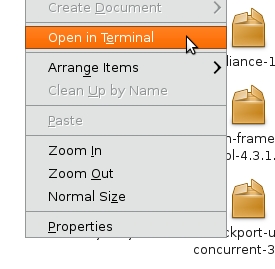
nautilus-open-terminal in action Often I find myself browsing to a directory in Nautilus and then realizing that I'd rather be in terminal. Other times I want to be in Nautilus when I'm in the terminal. There's certain things the command line is better at than the file browser and vice versa. Switching between the two is fairly easy in Gnome/Nautilus. Going from Nautilus to Terminal: You'll need the nautilus-open-terminal package ( sudo apt-get install nautilus-open-terminal; killall -HUP nautilus ). Then in any Nautilus, right click on white space and select "Open in Terminal" Going from Terminal to Nautilus: This one is simpler. I watched a guy at work do this on his Mac and got jealous. You can go from Terminal to Nautilus opened in your current directory by typing:  nautilus . ernesto@debian-t410s:~$ nautilus .

Linux zd1211 Wireless Speed Fix

For some reason my Belkin 54Mbps USB wifi adapter operates at 1 Mb/s under Linux. It's detected as the following by lsusb: Bus 001 Device 002: ID 050d:705c Belkin Components F5D7050 Wireless G Adapter v4000 [Zydas ZD1211B] If I do a iwconfig wlan0 rate 54M the card starts working at 54Mb/s. To fix this more permanently I added the following to my /etc/network/interfaces file: auto wlan0 iface wlan0 inet dhcp         wpa-ssid 56k         wpa-psk secret         wireless-rate 54M

Solaris on Virtualbox

Trying out Solaris on Virtualbox to troubleshoot an issue at work with no luck booting. The VM would hang after the grub prompt. Disabling USB support and sound support did it for me.